
Free · Unlimited domains · Native Telegram delivery
Telegram SSL Certificate Alerts
A free Telegram bot that watches every SSL certificate you care about and pings you before it expires. Three commands — /check, /remind, /domains — and you're done.
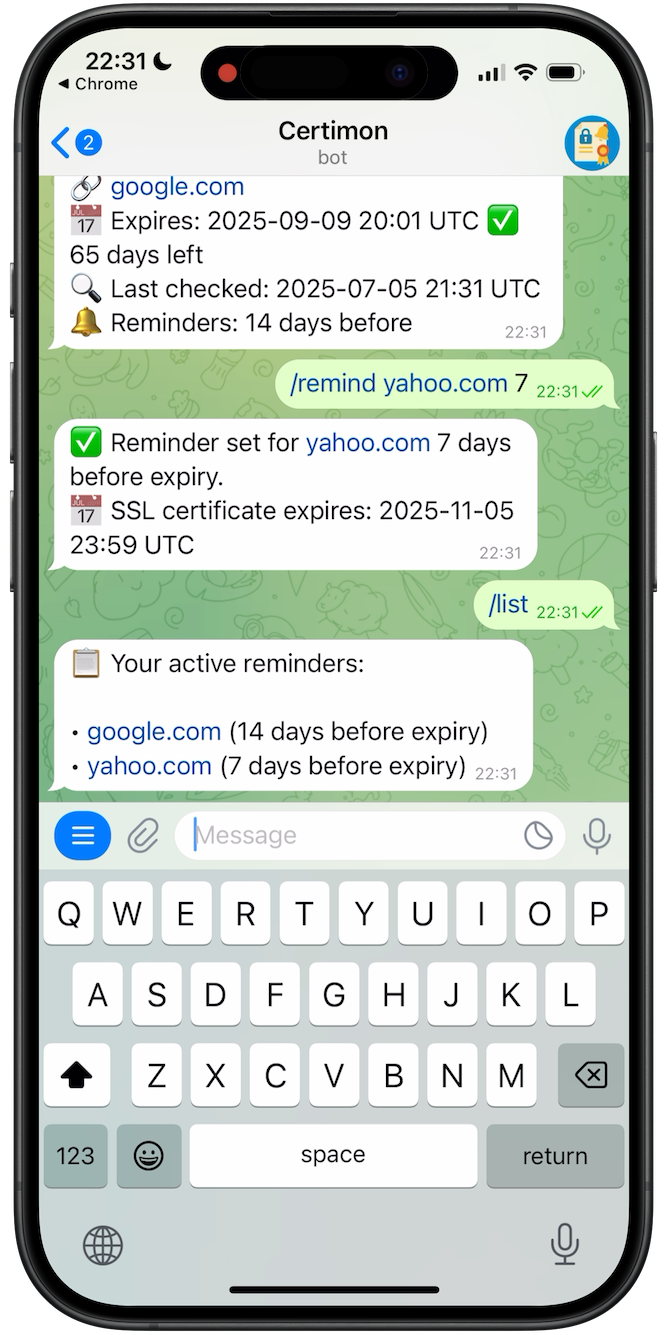
Why a Telegram-native SSL alert bot
Most SSL monitoring services email you. Email expiration notifications get lost — caught by spam filters, mangled by SPF/DKIM/DMARC tightening, forwarded to addresses that no longer exist, or buried in shared inboxes that nobody really watches. By the time anyone reads them, the certificate has already failed.
A Telegram message lands in the chat where you already get uptime, CI, deploy, and chatops alerts. It pushes to the device in your pocket and stays there until you read it. There is no SMTP delivery chain to fail, no inbox triage, no "from address" to allowlist.
Certimon was built around chat-native delivery from day one — the Telegram channel is one of several first-class delivery integrations (alongside Microsoft Teams and PagerDuty) for a small, focused SSL monitoring service.
The Telegram bot commands
Three commands cover 95% of usage. Run /help in the bot for the complete list.
/check <domain>
Performs an on-demand TLS handshake against the hostname you supply. Replies with the issuer, common name, SANs, signature algorithm, issued and expiry dates, and days remaining.
Example: /check google.com
/remind <domain> <days>
Adds the domain to your watchlist and schedules a Telegram reminder N days before expiry. Run it again with different N values to layer multiple reminders.
Example: /remind example.com 30
/domains
Lists every domain currently tracked for your Telegram chat, with each reminder window and the latest known expiry. Use /delete <domain> to remove one.
Pairs with: /delete, /help
Setup: Telegram SSL alerts in five minutes
Everything happens inside Telegram. No signup form, no email confirmation, no card on file.
-
1
Open @CertimonBot and press Start
The bot immediately replies with its command list and a one-line example. No verification email, no captcha.
-
2
Add a domain with /remind
Adding a domain and scheduling its first reminder are a single command:
/remind example.com 30
/remind www.example.com 30
/remind api.example.com 30
Certimon performs an immediate TLS handshake to confirm the hostname is reachable, then schedules the reminder.
-
3
Layer extra reminder windows
A single reminder is fragile — a single Telegram notification gets muted, scrolled past, or lost in a busy group. Layer extra windows:
/remind example.com 7
/remind example.com 1
A marketing site can usually live with 30 and 7. A checkout endpoint should also have 1.
-
4
Verify with /domains
Send /domains to confirm the watchlist. Use /check example.com at any time for an on-demand handshake — useful right after rotating a certificate.
Privacy & what the bot stores
The Telegram bot is intentionally minimal in what it knows about you:
- Your Telegram chat ID — needed to send messages back to you. No phone number, no email.
- The domains you ask it to watch and the reminder windows you set.
- The last observed certificate metadata for each domain (expiry date, issuer) so reminders can include useful context.
The bot can only see messages that explicitly mention it (commands sent to it directly, or commands sent in a group with bot privacy mode enabled — the Telegram default). It does not read your other chats, contacts, or media.
Want to stop tracking a domain? /delete example.com. Want to stop entirely? Block the bot in Telegram and your data becomes unreachable from the bot side.
FAQ — Telegram SSL certificate alerts
How do I get SSL certificate alerts in Telegram?
Open @CertimonBot in Telegram, press Start, and send /remind yourdomain.com 30. Certimon does an immediate TLS handshake and sends a Telegram message 30 days before the certificate expires.
Which Telegram commands does Certimon support?
/check <domain> on-demand TLS handshake. /remind <domain> <days> add a domain and schedule a reminder. /domains list everything tracked. /delete <domain> remove one. /help shows the full list.
Is the Telegram SSL alert bot free?
Yes. There is no paid tier, no per-domain fee, and no card required. You can track unlimited domains for free with as many reminder windows as you want.
Why Telegram instead of email for SSL expiry alerts?
Email expiry notifications get caught by spam filters, broken by SPF/DKIM/DMARC changes, and lost in shared inboxes. A Telegram message lands in the chat where you already receive uptime and deploy alerts, with no SMTP chain to fail. Replacing the discontinued Let's Encrypt expiration emails is a common reason people switch.
What data does the Certimon Telegram bot store about me?
Your Telegram chat ID, the list of domains you watch, the reminder windows you set, and the last known certificate metadata per domain. No email address, no password, no payment method. The bot only reads messages directed at it.
Does it work for internal hostnames not exposed on the public internet?
No. Certimon connects from the public internet, so the hostname must be reachable for the TLS handshake. For air-gapped or internal-only hosts, see open source SSL monitoring for a self-hosted setup.
Can I get the alerts in a Telegram group instead of a DM?
Yes. Add @CertimonBot to a Telegram group and run /remind from inside that group. The reminders go to whichever chat (DM or group) you used when subscribing each domain.
Related guides
Free SSL certificate monitoring
Unlimited domains, no signup, Telegram delivery — the full pricing and limits page.
Let's Encrypt expiration email alternative
Replace the discontinued Let's Encrypt expiration emails with Telegram reminders.
Check SSL certificate expiration date
openssl, the browser, and the Certimon bot — three ways to inspect a live certificate.
expiry.letsencrypt.org bot alternative
Self-hosted bot users who need a maintained Telegram-native replacement.
Microsoft Teams SSL alerts & expiry reminders
Pair Telegram's mobile push with team-visible Teams cards on the same alerting rule.
Get your first Telegram SSL alert in five minutes
Open the bot, send /remind yourdomain.com 30, and never let a certificate expire silently again.
Open @CertimonBot